Export Document Readiness Workflow: How Japanese Car Exporters Prevent Shipment Delays

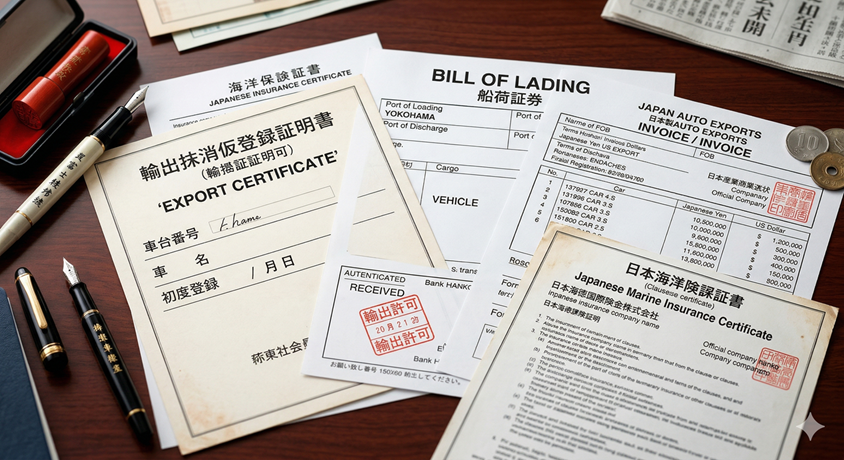
A lot of exporters think document problems begin when a file is missing. In reality, the problem usually begins much earlier, when the business cannot answer a basic question with confidence: is this vehicle actually document-ready for the next stage? That is why an export document readiness workflow matters. It turns paperwork from a passive file list into an operating signal the team can trust when deciding whether to book, release, communicate with the buyer, or escalate an exception.
This distinction matters because a document checklist and a readiness workflow are not the same thing. A checklist may show whether certain files exist. A readiness workflow shows whether the right file exists, whether the team accepts it as current, who owns it, which shipment stage depends on it, and what happens if it is late. For Japanese used car exporters, those questions influence vessel timing, customer updates, payment timing, and management confidence more than the file itself.
This guide explains how exporters should structure an export document readiness workflow across purchase confirmation, vehicle intake, booking, release, and departure. If you need the broader paperwork overview first, read car export documents from Japan. If you want the end-to-end process context, use auction-to-shipment automation after this.
Core operating principle
A vehicle is document-ready only when the team knows what is required, who owns it, whether the file is approved, and which shipment stage can safely proceed because of it.
Why document readiness is a workflow problem, not only a paperwork problem
Export paperwork feels administrative, but the damage from weak paperwork is operational. A missing or unclear document can block booking decisions, delay shipment release, create port charges, slow payment collection, or force buyer communication into vague promises. That is why document readiness should sit inside the live workflow rather than in a disconnected folder system. If the operations team, logistics team, and customer-facing team are each checking different records, readiness stops being reliable.
This is also why exporters often misdiagnose document problems. They assume the issue is only that the file was late. In many businesses, the deeper issue is that nobody could see the real status early enough. The team did not know who owned the document, whether the file was market-specific, whether a version was outdated, or whether booking should wait. A workflow-based model makes that hidden uncertainty visible before it becomes shipment delay.
Once you define document readiness as an operating status rather than a filing activity, the next design questions become much clearer: which milestones require proof, which roles can approve readiness, which exceptions need escalation, and which customer updates depend on that readiness being true.
The eight document-readiness checkpoints exporters should control
1. Purchase confirmation context
The workflow begins before a document exists. Once a unit is purchased, the exporter should already know destination market, buyer context, route assumptions, and any obvious paperwork sensitivity. If the destination has special document risk, that fact should be visible from the first record, not discovered at the booking stage.
2. Vehicle identity completeness
Document readiness depends on clean vehicle identity data. Chassis number, customer linkage, cost context, and shipment reference logic all need to be complete early. Teams lose time when document owners must chase missing base information before they can even prepare the right paperwork.
3. Required-file definition by market
A strong workflow distinguishes between globally required files and market-specific documents. The point is not to create a huge compliance engine at the beginning. It is to know which vehicle cannot move without which file so teams stop treating every shipment like an exception.
4. Ownership and due-date assignment
Every required document should have a visible owner and expected timing. This is one reason file storage alone is not enough. If the document exists somewhere but no one owns readiness, the process is still fragile. Ownership makes escalation possible.
5. Version and approval control
The business needs to know whether the current file is the approved one, not only whether a file has been uploaded. Weak version control is one of the fastest ways to create downstream confusion across logistics, brokers, and buyers.
6. Booking gate logic
The workflow should answer a simple booking question: can this unit move to booking with the current document state, or is something still blocking it? If logistics must manually ask several people before every booking, the document layer is not structured enough.
7. Release and departure verification
Readiness should be checked again before shipment release or departure communication. Some exporters assume that once booking happens, the paperwork risk is over. In practice, this is often where final inconsistencies appear.
8. Exception aging and escalation
A blocked document should not remain private knowledge. The workflow needs an exception view showing what is blocked, how long it has been blocked, who owns it, and whether management should intervene. Without that visibility, small document issues survive too long.
How to map document readiness to shipment stages
The cleanest way to design an export document readiness workflow is to map it to stages instead of thinking in one large paperwork bucket. Some files matter before a purchase is operationally confirmed. Some matter before booking. Some matter before final release. Some matter during customer communication because the buyer expects a milestone update based on that paperwork. When the workflow is stage-based, teams know not only what is missing but why it matters right now.
| Stage | Readiness question | Typical owner | Commercial risk if unclear |
|---|---|---|---|
| Purchase confirmed | Do we already know the market-specific document path? | Operations | Bad route assumptions and weak early planning |
| Vehicle in workflow | Is the record complete enough to support the paperwork layer? | Operations or admin | Repeated rework and missing context |
| Pre-booking | Can logistics trust document status enough to book? | Documents and logistics | Wrong booking decisions and rushed exceptions |
| Pre-release | Are final approved files in place? | Documents owner | Departure delay and partner confusion |
| Buyer communication | Can the customer update be supported by actual readiness? | Sales or buyer team | Trust loss and re-explanation work |
This stage mapping keeps the document layer connected to real workflow decisions. It also makes it much easier to explain to the team why certain files must be controlled at particular moments instead of treated as general admin backlog.
What a strong document-readiness workflow looks like in daily operations
In a strong setup, every vehicle has one live record, and the document layer is attached to that record rather than sitting in scattered inboxes or shared folders with weak context. Required files are defined against the destination and shipment model. Ownership is visible. The system distinguishes between uploaded, reviewed, approved, and blocked states. Booking readiness is derived from those conditions instead of from repeated manual conversations.
This design reduces two kinds of waste. First, it reduces follow-up waste, because fewer people need to ask whether a file exists or whether a vehicle is safe to move forward. Second, it reduces interpretation waste, because the workflow tells the team what the document state means for the next decision. That matters a lot for exporters who handle multiple users, multiple destinations, or frequent booking changes.
A strong workflow also makes training easier. New staff do not have to learn document quality only through correction cases. They can follow visible stages, owners, and rules. That is one reason exporters moving from spreadsheets to software often improve document control faster than they expected.
Common failure patterns that keep exporters stuck
The first failure pattern is treating file existence as readiness. A document may be uploaded, but if the team does not know whether it is the right version, approved for the next stage, or complete for the destination market, the shipment is not truly ready. Upload status is not the same thing as workflow trust.
The second failure pattern is weak ownership. When multiple people can theoretically handle a document but nobody is clearly responsible for readiness, delays remain invisible too long. This is especially common in growing teams where operations, admin, and logistics all touch the same unit but with different assumptions.
The third failure pattern is late market validation. If destination requirements are not considered until after the booking conversation begins, the team is already working under pressure. The earlier you attach market-sensitive document logic to the vehicle, the less likely you are to discover a blocker at the worst possible time.
The fourth failure pattern is poor exception visibility. A document issue that lives inside one person's awareness becomes much harder to solve than one that appears as a visible blocked state with aging and ownership. Exporters that fix this one issue often feel an immediate reduction in operational stress.
How document readiness connects to buyers, booking, and margin
Document control is not only a back-office quality issue. It influences the buyer experience directly. If the team sends milestone updates before readiness is actually confirmed, the exporter creates a trust problem that later turns into re-explanation work. If the team delays communication because it does not trust the document state, the buyer sees that delay as poor coordination. Either way, weak document readiness affects the commercial relationship.
The same is true for margin. A document blocker can cause storage, correction, or delay costs that are much larger than the original paperwork mistake. That is why document readiness should sit alongside booking, stock age, and exception reporting in management review. Exporters who think of paperwork as a minor administrative detail often underestimate how directly it affects profitability.
When document readiness becomes visible in the live workflow, both buyer communication and internal decision-making become more reliable. That is the real business value behind this process.
The weekly dashboard exporters should review
A practical document-readiness dashboard does not need to be complicated. It should show vehicles blocked by document state, average age of document exceptions, units waiting for approval, units considered booking-ready, and units where buyer communication is delayed because the paperwork layer is not trusted yet. If you serve several markets, the dashboard should also reveal whether one route or destination creates repeated document friction.
This weekly view changes behavior because document problems stop feeling random. Management can see whether delays come from weak ownership, bad upstream vehicle data, version confusion, or market-specific rules that the workflow has not formalized well enough. That turns paperwork from a reactive firefight into a measurable operating discipline.
This kind of visibility is one reason exporters evaluating car export automation software should ask how document readiness appears in the live workflow, not only where the files are stored.
How permissions and approvals reduce document mistakes
Document workflow improves when permissions are clear. Not every user should be able to overwrite critical files, change approval state, or mark a unit booking-ready without responsibility. As teams grow, uncontrolled editing becomes one of the biggest hidden causes of document confusion. One person uploads a new file, another assumes it is approved, a third person shares it with a partner, and only later does someone realize the version was still incomplete. That is not a filing problem. It is a governance problem inside the workflow.
A better model separates document contribution from document approval. Operations may provide vehicle context. A documents owner may review whether required files exist and are correct. A manager or defined role may approve final readiness for booking or release. This keeps the workflow faster because people know what they are responsible for, but it also keeps the system safer because later decisions are based on trusted states instead of assumptions.
This is especially important for exporters working across branches or with several document-heavy destination markets. Once more users touch the same shipment, permission control stops being optional. It becomes part of what keeps the readiness model trustworthy.
Questions managers should ask when document delays repeat
When document delays happen repeatedly, management should not ask only who missed the file. It should ask what part of the workflow made that miss easier to happen. Was the requirement defined too late? Was ownership unclear? Was the current version hard to identify? Did booking logic ignore a blocked state? Did customer communication move ahead of actual readiness? These questions turn document control from blame into process improvement.
This review usually shows that repeated document errors are linked to one of three root causes. Either the required rule was never formalized clearly enough, the ownership model was too weak, or the team had no shared place to see the status. Once you identify which cause is dominant, the fix becomes more precise. You may need a better market-specific checklist, a stricter approval rule, or a clearer blocked-state escalation path.
That is why the best monthly document review is not a file audit alone. It is a workflow audit around where trust broke down and how to stop the same problem from reaching the next shipment.
What exporters should avoid when fixing document workflow
The first mistake is trying to model every rare scenario before the basic workflow works. Exporters often know there are market-specific exceptions, partner-specific quirks, and unusual correction cases. Those matter, but they should not stop the business from first defining the common path clearly. If the everyday document flow remains weak, advanced exception logic will not save the operation.
The second mistake is keeping the document model outside the main vehicle record. That may feel convenient for the document team, but it forces later departments to reconstruct context manually. The third mistake is treating document control as a late-stage admin concern rather than a pre-booking readiness signal. Exporters that wait too long to check readiness usually discover problems only when the schedule is already tight.
A disciplined exporter therefore starts with a lighter but stricter workflow: one record, clear owners, visible blocked states, and stage-based approvals. Once that foundation is stable, the team can handle more complex cases without losing control.
A realistic 60-day rollout for document workflow control
In the first 30 days, define the minimum required-file sets, stage-based readiness statuses, ownership model, and blocked-state logic. The priority is not to model every rare case. It is to create enough structure that the team can stop asking the same document questions repeatedly. Apply the process first to new live units rather than trying to repair years of history on day one.
Between days 30 and 60, add approval control, exception aging, and booking-gate checks. This is also the right time to connect document readiness to buyer milestones so customer-facing staff stop communicating from guesswork. If a unit is blocked, the workflow should explain why and who owns the next action.
After that foundation is working, exporters can expand into deeper market-specific logic, partner coordination rules, and reporting refinements. This staged model usually delivers faster adoption because the team sees immediate operational relief instead of only a larger admin system.
External references exporters should keep in view
Document-readiness workflow belongs inside your own operation, but exporters should still stay aware of external sources such as Japan Customs, JETRO, and the World Customs Organization. Those sources do not design the internal workflow for you, but they help teams stay aware of the wider trade and customs context around document control.
The stronger exporters usually combine disciplined internal readiness logic with steady awareness of the external rules and trade conditions that influence shipment execution.
Suggested image alt text for this article
- • Export document readiness workflow for Japanese car exporters
- • Shipment document control dashboard for vehicle export operations
- • Car export paperwork readiness process before booking and release
Related guides for exporters fixing document control
Car export documents from Japan
Start with the paperwork checklist, then use this page to turn it into a live workflow.
Auction-to-shipment automation
See how document readiness fits inside the wider exporter handoff chain.
Car export status tracking
Connect document readiness with the status model used by operations, yard, and logistics.
Car export workflow automation
Review the bottlenecks that weak document control usually creates across the rest of the workflow.
Related Solutions
Put document readiness inside the operating system
Car export automation software
See how CarDeal365 turns paperwork checkpoints into workflow decisions instead of separate admin tasks.
Car export management software
Review the broader exporter system behind documents, approvals, bookings, and reporting.
Car export software features
Compare the modules for roles, workflow, inventory, and reporting that support cleaner document control.
Frequently asked questions
What is an export document readiness workflow?
Why is a document checklist not enough?
When should readiness be checked before booking?
Need a workflow that keeps documents tied to real shipment readiness?
The strongest exporter software does more than store files. It tells the team what those files mean for booking, release, and buyer communication.
If that is the workflow you want, review CarDeal365 with your real document bottlenecks in mind.
Book a Free DemoRelated reading
AI Chatbot for Car Dealerships
What an AI chatbot should and shouldn't handle for a car dealership: routine availability and spec questions answered instantly, with a c...
Vehicle Shipping Workflow
How to track a vehicle's shipping status internally, from booking through delivery: defining stages, assigning owners, and connecting shi...
Digital Bill of Lading Management
How exporters manage the Bill of Lading digitally: telex release vs.
Export Compliance Checklist
A scannable export compliance checklist covering business registration, per-market import rules, pre-shipment inspection, documentation, ...
Export Documentation Management Software
What export documentation management software should actually do: pulling documents from the vehicle record, tracking document status aga...
Negotiating Ocean Freight & Shipping Rates
Ultimate exporter guide to negotiating ocean freight and shipping container rates for Japanese used car exports.
About the Author
Muhammad Khabir Uddin
Founder, CarDeal365 · 6+ years in automotive export & SaaS
View LinkedIn Profile